Interactive garden · Solo project
Sand Garden
A little room for stillness. Make a pattern, watch one form, or leave the garden playing.
Design + build · Three.js, React, TypeScript · Updated Sep 2026
- Six gardens
- From an open bed of sand to a bamboo fountain and a landscape with koi.
- Watch or join in
- Let Auto tend the board, or pick up a rake, a single point or a smoother.
- Keep a moment
- Capture a picture, replay your strokes or download a video of the process.
Why this exists
Sand Garden began as a small moving scene for my portfolio. I wanted a place where visitors could linger, then pick up a rake if they felt like joining in. The challenge became making both watching and drawing feel satisfying, on a phone as well as a larger screen.
Where it landed
The garden has six preset boards, four ways to guide a tool, and an Auto mode that keeps making new patterns over the existing sand. It runs independently of the portfolio, with a separate display view for leaving a selected garden playing. Sand sound and music are optional. The design has been refined through my own use and feedback during the build; I have not measured visitor retention or tested it in cafés yet.
Where this is going
A garden people can return to, or leave quietly playing in a space they share.
- Try the display in real spaces, including cafés, and see what works over longer sessions.
- Watch people use the tools on their own phones, especially the first stroke.
- Refine the compositions and material through use, without adding more controls.
How it got here
The decisions, dead ends and small wins worth keeping. Not everything, just what mattered.
-
Sep 2026 product
A reason to linger
I wanted something on my portfolio that people could spend a little time with. The first brief was a Japanese sand garden that formed itself, with small interactions to follow. The initial question was whether watching it could feel satisfying before asking anyone to do anything.
-
Sep 2026 design
The rake had to be able to draw the pattern
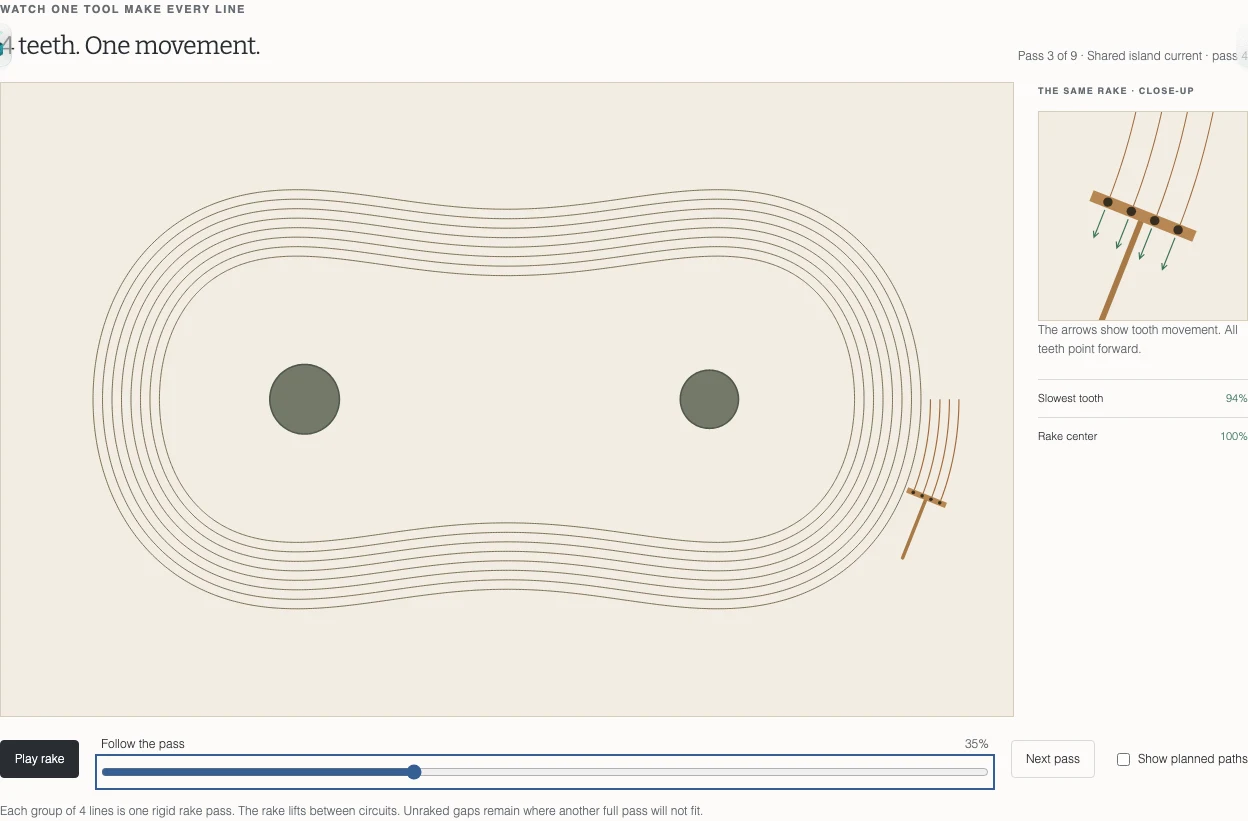
The first patterns looked unfinished. They wandered around the board, ended against its boundary and did not seem to belong to one composition. I brought in reference images with broad currents, local rings around rocks and fields that changed direction as they met. More complexity meant making those relationships work together.
I asked to see the mathematics in two dimensions first. We drew patterns in a box using circles, sine curves and rounded returns. Some looked convincing as drawings, but I could not imagine drawing them with a rake. At a tight turn, neighboring lines would require different teeth to move in opposite directions. The pattern and the tool had been designed apart.
We changed the representation. One moving rake became the source of every groove. Each tooth followed its offset from the same position and orientation, and the study showed a close-up of the teeth through a turn. The accepted paths could then drive the 3D scene directly. The rake's width, the marks it made and its clearance around stones shared the same dimensions. Its tilted handle mattered too: clearing the rake head alone did not stop the handle from running into a rock.
I wanted completed circuits for the automatic composition. Later, when visitors could draw, I explicitly allowed open strokes. Those are different promises. A composed garden should look intentional; a person should be able to stop a stroke wherever they want.
-
Sep 2026 design
Make the marks visible, then remove the dials
Four larger teeth, stronger groove contrast, retina rendering and a smaller on-screen board made the scene easier to read. Temporary tuning controls helped me choose the sand colour, depth and lighting. Once those values felt right, I removed the controls from the visitor experience.
-
Sep 2026 design
Separate drawing a curve from moving a rake
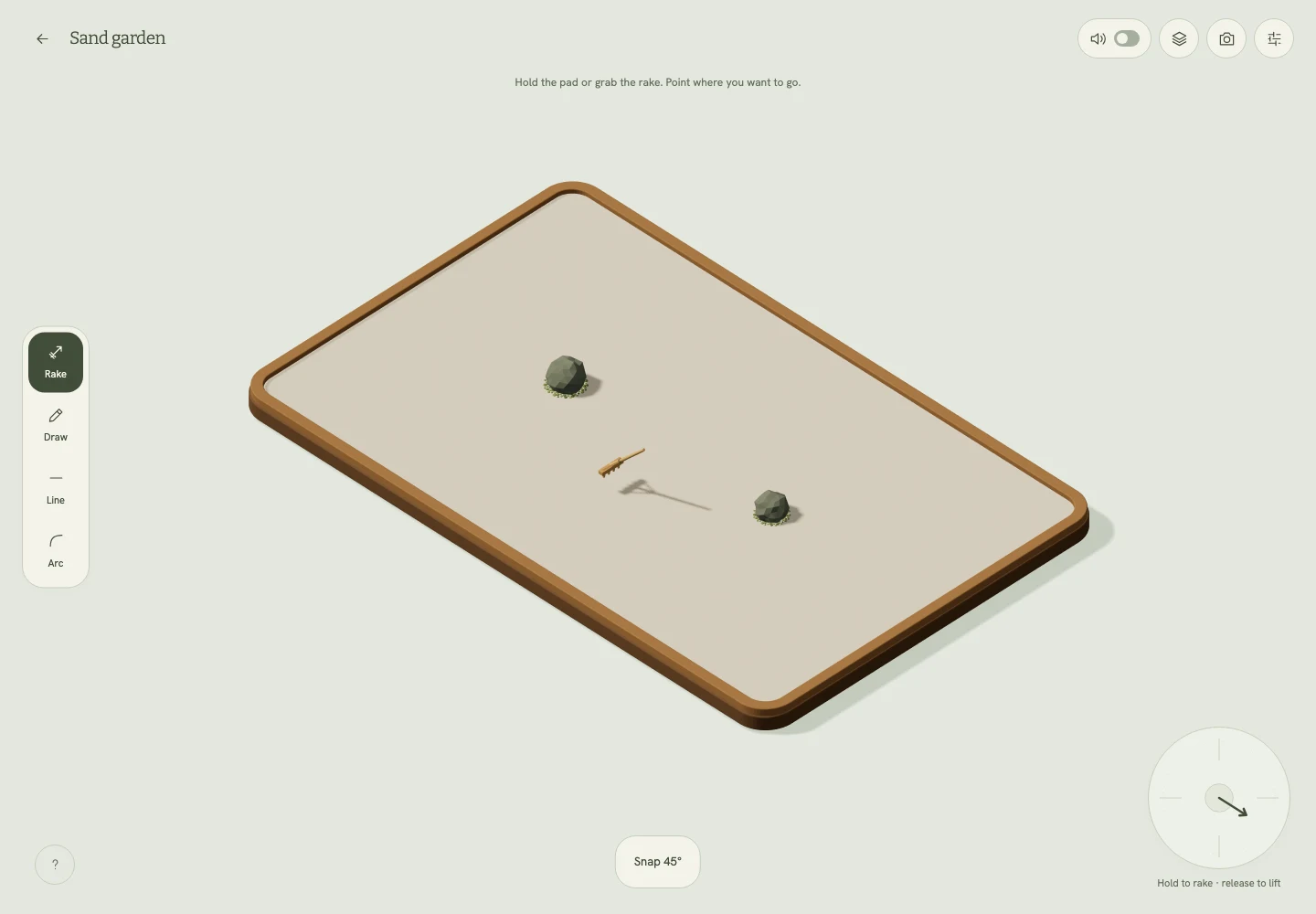
I wanted the feeling of a stabilized pencil: draw ahead, adjust the waiting curve and let the rake follow it. The early version replayed cursor motion after a delay. A fast gesture still produced a fast rake, only later. Bending the queue was difficult to understand, and a long delay did not make a messy line feel deliberate.
We separated three jobs: collecting the gesture, shaping a smooth curve and moving the rake along that curve. The rake gained a maximum travel speed independent of the pointer. The waiting path stayed visible, and a pause control gave people time to edit it before the rake arrived. I removed the minimum turning radius from manual drawing. People should be able to make their own marks, including awkward ones.
Freehand drawing was only one way in. I also liked steering, but a one-dimensional control became confusing when the rake turned in an isometric view. The steering pad became a two-dimensional direction control that follows the screen. Straight lines and arcs became explicit tools with handles on the sand. Quarter circles, semicircles and full circles offered recognizable shapes; angles snap in five-degree steps without another toggle.
The interface changed with those decisions. I chose a garden workbench: tools to one side, camera controls to the other, and only the current tool's controls near the board. Repeated labels and hidden parameter panels gave way to direct handles, familiar play and pause icons, and a projected rake that shows where a pass will begin.
-
Sep 2026 product
Compose the board before asking someone to draw
I chose preset landscapes over an object editor. Their differences had to come from scale, silhouette and open space, not just counting rocks. The boards grew into a bonsai garden, a bamboo fountain, a lantern court, a koi pond and quieter alternatives. Pinch zoom lets a small phone get closer to the same sand.
-
Sep 2026 build
Scratching through sand, instead of drawing on it
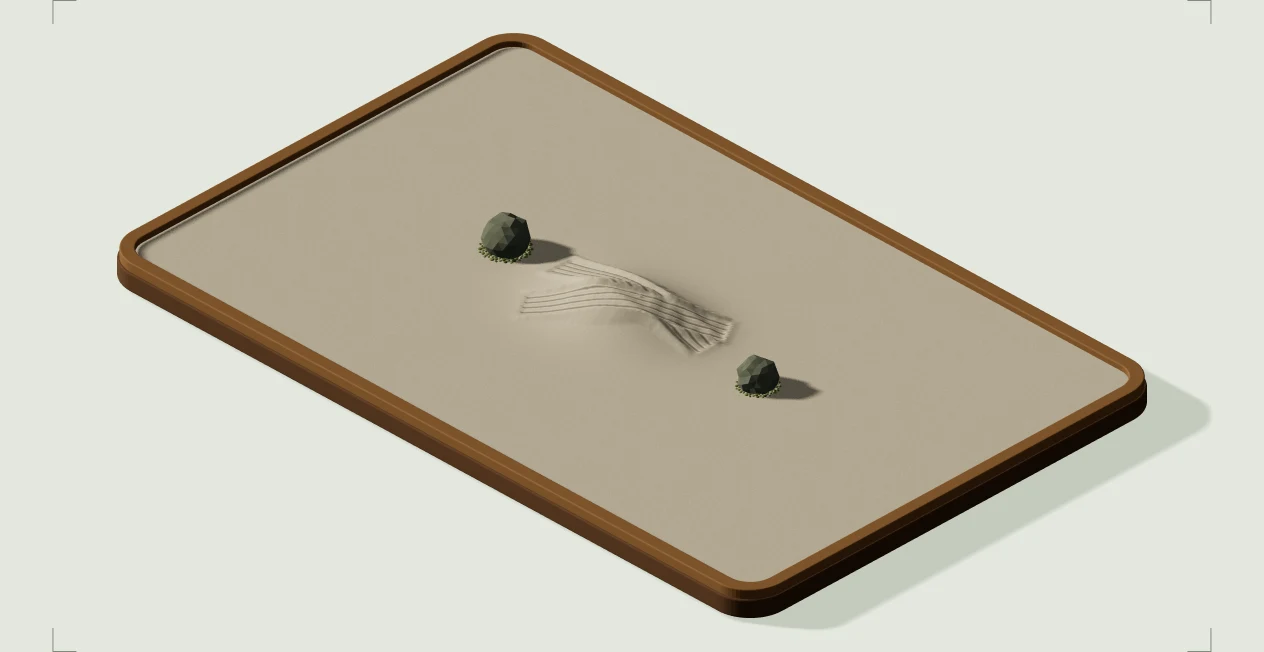
The early surface still felt like paper. Grooves crossed older grooves without displacing them, and stronger shadows only made the line drawing more visible. I wanted a new pass to behave like sand: remove the older marks under the tool and leave the new grooves behind.
The surface changed to record the swept area of the tool. A newer pass replaces the marks it crosses. Each tooth cuts its own groove, while displaced ridges, grain and local settling help the marks read as a material. The smoother and the single-point tool act on that same surface. They do not add unrelated decorative lines on top.
That still left the board too flat. I asked for small irregular mounds, like sand that has been poured into a tray. The first interpretation was one broad rise, which was too large and made the scene too dark. We kept a shallow height field and distributed smaller mounds across the regular boards. The rake follows the height beneath it as it works. An open-sand board stays flat, and the lantern court has one larger mound as part of its layout.
I stopped short of a complete simulation of every grain. The useful question was what a person could see and feel while raking. Surface relief, erased crossings and local sand movement did more for that feeling than adding another pattern family. Once the material and lighting were acceptable, I left those settings alone and returned to the experience around them.
-
Sep 2026 design
Listen while the rake turns
The sound went through several revisions: metallic, then muffled, then too loud. I wanted a gentler texture with useful volume control at the quiet end, and changes as the rake moved and turned. Pure tones did not feel like calming music to me, so music became a separate, optional recording. Both start off.
-
Sep 2026 product
Keep the process, without undo
A photo kept the result, but the making was worth keeping too. We added a record of the actual strokes for replay and video export. I considered undo and redo, then removed them from the brief. In this garden, changing your mind means running a tool over the sand again.
-
Sep 2026 build
Give Auto a whole board to compose
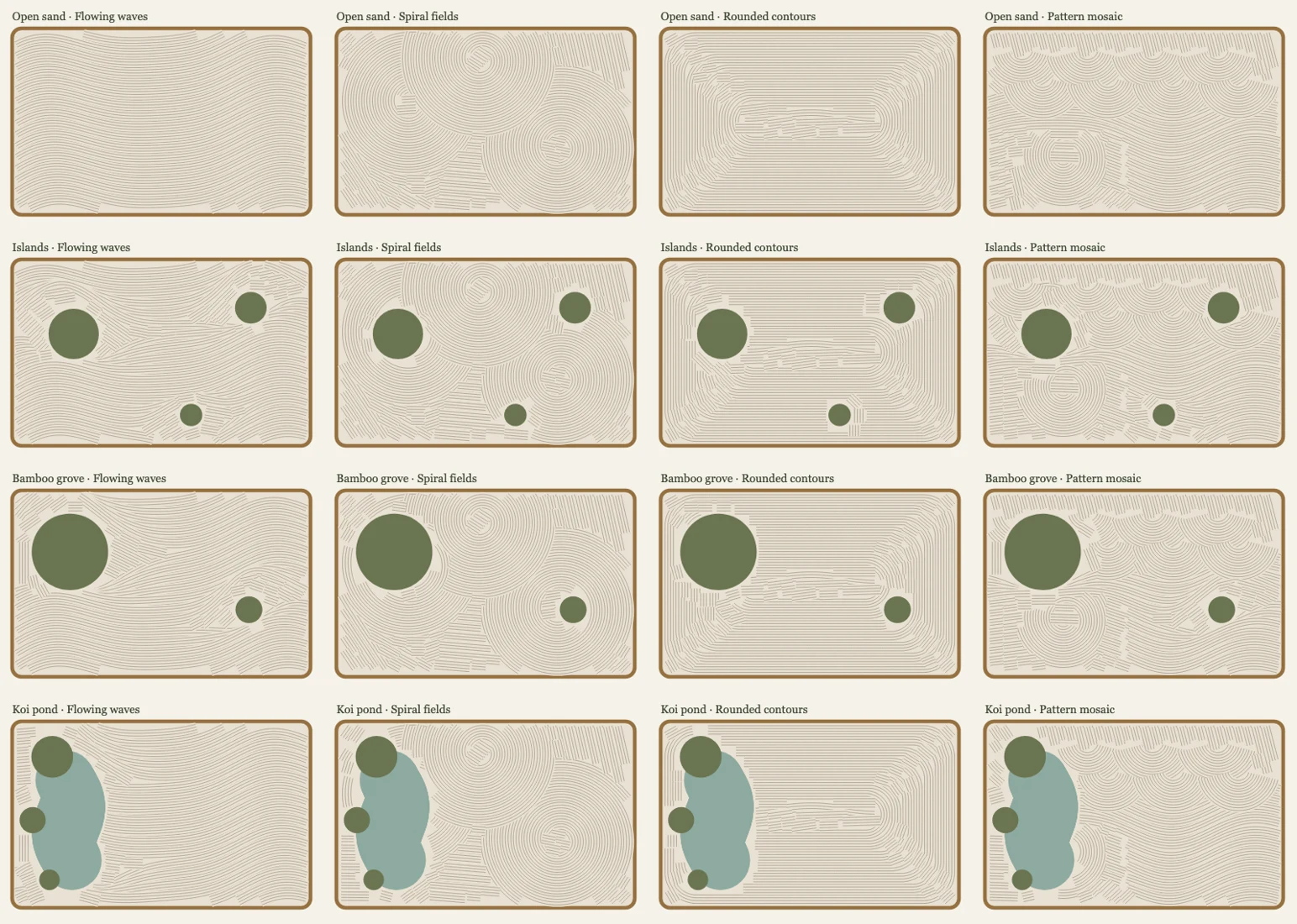
Random circles and short lines were too isolated. Auto now works through waves, spirals, rounded contours and mosaics, seeking the remaining reachable areas before changing composition. It keeps working over the existing surface. A finished pass becomes material for the next one, instead of the board clearing itself on a timer.
-
Sep 2026 product
A garden with its own address
What began as a portfolio artifact became something I wanted people to return to directly. I moved its story into a case study and gave the garden a standalone address. A separate display session can keep one board playing with its controls tucked away. Cafés are one place I would like to try it; that is a direction for the project, not an outcome yet.
Nothing filed under that one yet.